
Viva Topics is fresh right now and some of you might have already started looking at extensibility. One thing that is useful to know is to know where the Topic Center site is after you’ve created it. It turns out you can find this value pretty easily from any page in your tenant.
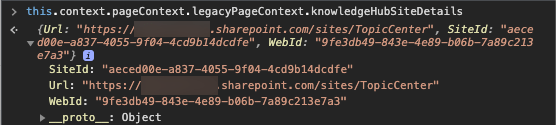
If you look at your context object from a Web Part or Application Customizer, you can find what you are looking for in the object below:
this.context.pageContext.legacyPageContext.knowledgeHubSiteDetails
There you will find the SiteId, Url, and WebId. That should be useful if you are trying to get a reference to the site with PnPJS and then do things like create pages or add web parts.
If you haven’t explored the object this.context.pageContext.legacyPageContext before, you can find a wealth of information in there. Try it out today.
 Corey Roth's Blog