That’s a mouthful! Microsoft announced this year that all legacy Application Insights instances must be upgraded to use a Log Analytics Workspace. For the most part this is a good thing and provides you new features. The upgrade is rather simple and it’s supposed to be seamless. However, I have found a case in the customMetrics table where the value column is no longer populated. If you are relying on this column in your queries, that could be an issue.
Take a look at the example below where I ran the following table a few minutes after upgrading the Log Analytics Workspace.
customMetrics | sort by timestamp desc
You’ll see shortly after 3:10 pm, the value column no longer has a value. This occurs with Application Insights JavaScript SDK version 2.6.2 but I don’t know if it’s an SDK issue or not.
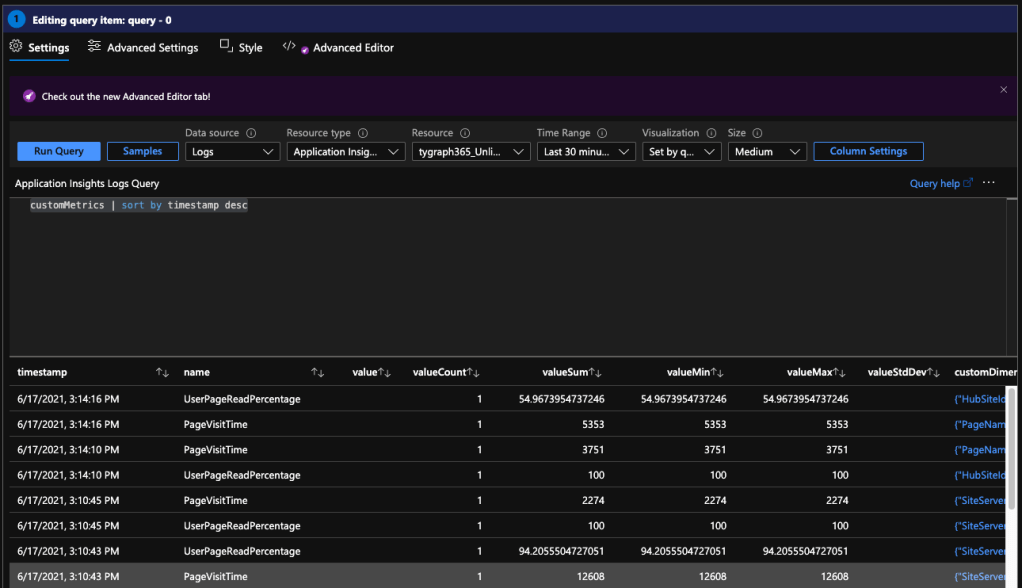
To work around this, I have shifted to using the valueSum column which seems to have the same value as all of the other value columns. The documentation mentions that the field has been removed when using Log Analytics to query, but apparently it also affects Application Insights as well.
 Corey Roth's Blog