Last week, I was building some simple request forms using Microsoft Forms and I wanted to embed one on a modern SharePoint Page. I created, the form, added the Microsoft Forms web part, but when I pasted the link to the form, I got the following error:
This is not a valid form link. Please copy a URL from Microsoft Forms.
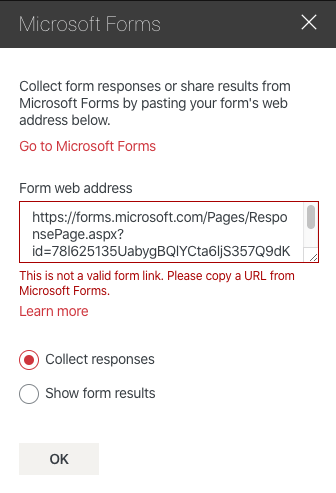
I thought that was odd, but I couldn’t get it to work. I tried creating a new form and still no luck. I gave up and tried it later with a new form and then I noticed it worked. After studying the URLs I noticed something very unique. One was from forms.microsoft.com and the other was from forms.office.com. They used different pages and parameters in the URL as well. While you can visit either URL and create a form, the Share link only provided a working URL if you use forms.office.com. Both of the links work and allow you to complete a form, but only the link from forms.office.com will work in the Microsoft Forms web part.
If you run into this error, be sure and check your URL.
 Corey Roth's Blog
Thank you you saved me losing my mind!
LikeLike
You’re amazing. Thank you.
LikeLike